Apple Intelligence Explained: How to Enable It and How It Compares - Part 2
How to use Apple Intelligence - get going!
6/15/20251 min read


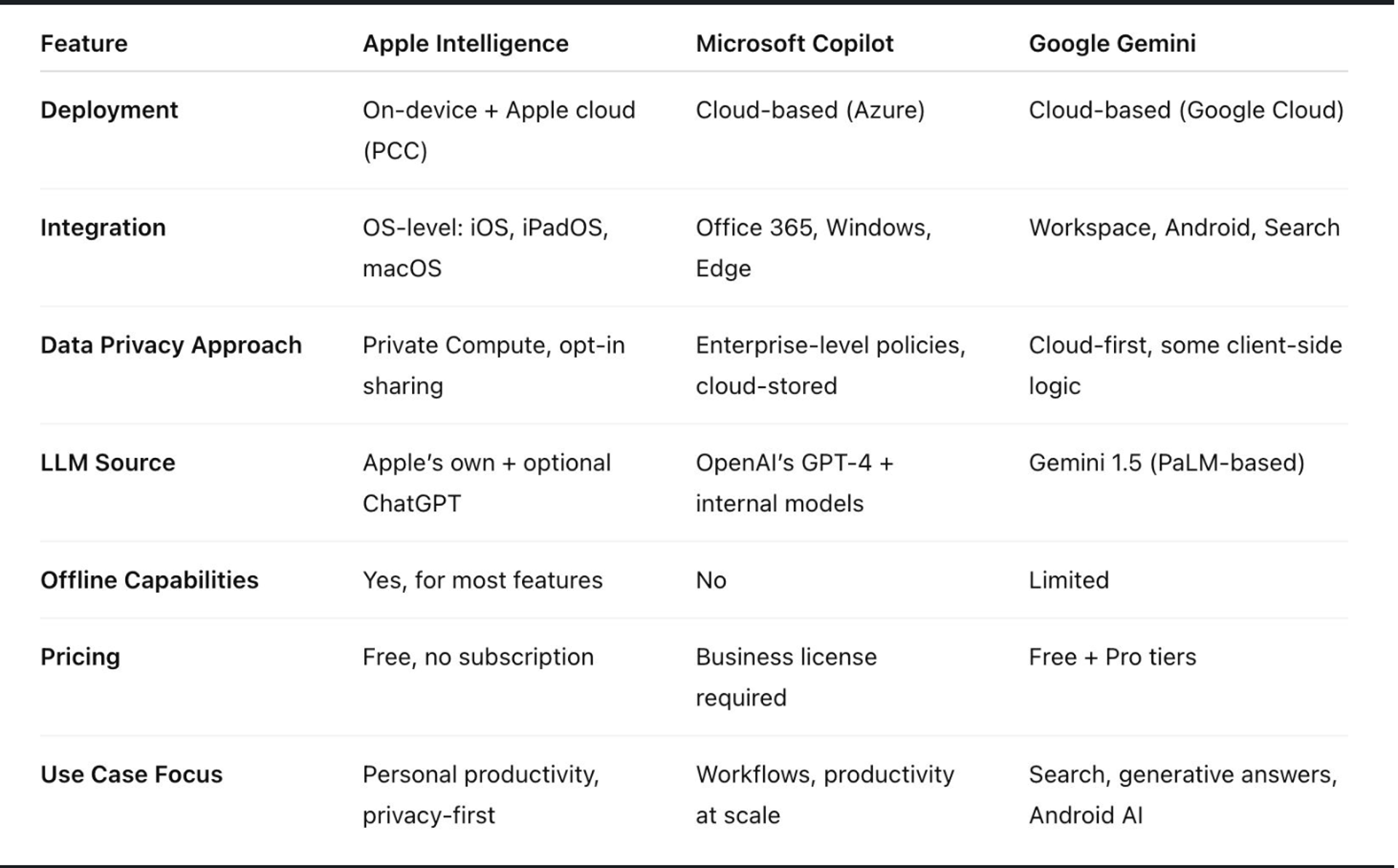
In this Part 2, let’s move beyond the “what” and look at the “why” — and how it stacks up against Microsoft Copilot and Google Gemini.
⚙️ Real-World Use Cases: What Can You Actually Do With It?
- Apple Intelligence isn’t a standalone app — it’s embedded into how you interact with your device.
Here’s what it looks like in practice:
✅ Email Drafts, Rewritten
Rewrite an email in Mail with a different tone — formal, friendly, concise — without opening another app.
✅ Context-Aware Siri
Ask Siri to "send Rob the PDF from yesterday’s meeting" — it’ll figure out the document and the contact.
✅ Smart Photo Lookup
Search your photos with natural language: “Show me pictures of my dog in the snow from last year.”
✅ Notifications, Prioritized
On-device sorting and summarization of alerts — so you only get the ones that matter.
✅ System-wide Text Tools
Rewriting, proofreading, and summarizing available across Notes, Mail, Safari, and third-party apps.
✅ App Actions by Voice
You can say, “Move this file to the shared folder and email it to the team,” and it happens.
⚖️ Risks vs Benefits: Is It Worth Using?
🔐 Privacy First
On-device processing minimizes data sharing.
When offloaded, requests go to Apple’s own Private Cloud Compute — not to third parties.
You're always notified before anything is shared.
💥 Risks:
- False Confidence in Accuracy – Like any LLM, it can confidently be wrong.
- Opaque Behavior – Despite Apple’s transparency push, edge cases (e.g. when offloading happens) may be unclear to users.
- Limited Customization – Compared to open-source or enterprise models, Apple’s offering is less configurable.