How to configure iOS Web enrollment - Intune
How to configure iOS Web enrollment. Step by step.
7/28/20241 min read
When iOS / iPadOS 18 is released - no more User driven enrollment using the Company Portal App.
This is what you need to know to get get testing right now so you don’t get surprised when the change is completed in Intune and your Company Portal App enrollments start to fail…..
Requirements:
Devices must run iOS/iPadOS 15 or later
The Microsoft Authenticator app is required for work or school access
Setup Steps:
Deploy the web app version of Intune Company Portal, create a device configuration policy for JIT registration, and create an enrollment profile.
User Experience: Users enroll via Safari, and after compliance checks, they can access work apps without needing to sign in again during the session
NOTE! to enroll, users must use the Safari browser, as it is the only supported option for this process. They need Safari to download the management profile and complete the enrollment.
Let's configure the Web enrollment:
Create an Web Enrollment Profile:
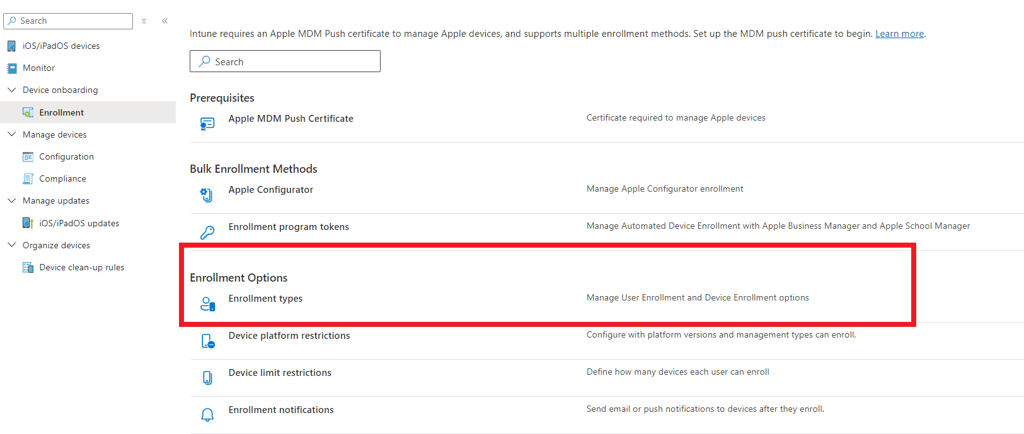
Go to Devices > Enrollment in the Microsoft Intune admin center.
Select the Apple tab.
Under Enrollment Options, choose Enrollment types.
Click Create profile > iOS/iPadOS.
Configure the Profile:
On the Basics page, enter a name and description.
Click Next.
On the Settings page, select Web based device enrollment (or other type that fits your scenario best)
Click Next.
Assign the Profile:
On the Assignments page, assign it to all users or a specific group.
Click Next.
Review and Create:
On the Review + create page, review your settings and click Create.
Manage Profiles:
Return to Enrollment types to see your profiles.
Drag and drop profiles to set their priority.
This process enables users to start enrollment in Safari webbrowser , no other broweser is supported during enrollment. When completed, the user can use any browser for accessing corporate data.
Users will open Safari and go to https://portal.manage.microsoft.com/conditionalaccess/enrollment
and follow the enrollment instructions.
Pretty straightforward bot for Intune Admin and the user.
Go 4 it ! 😊